Ad monetization
In the Ad monetization report group, you can view reports:
- Ad monetization
- MM Key Metrics by App
- MM Key Metrics by Country
- MM Revenue by Monetizer
- Total Ad Engagement by App
- Total Ad Monetization Overview by App
(MM goes for Mobile Mediation)
Using segmentation you can pull out specific users and compare data from different periods and segments.
The report contains metrics grouped into dimensions.
To set up dimensions and metrics:
-
Click the buttons Dimensions and Metrics one by one.
-
In each window, add dimensions and metrics you want to use to build the report.
-
Configure the order of metrics and dimensions.
The order of metrics determines the order of columns, the order of dimensions determines the nesting of rows in the table.
To restore the default metrics, dimensions, and settings, click Reset.
Dimensions
The following dimensions are available in all ad monetization reports:
Event date
- Day.
- Week.
- Month.
- Year.
Geography
- Country.
- District.
- City.
App
- Platform.
- Bundle ID.
- App ID
Ad unit
- Ad unit.
Mobile mediation
App
- App ID (MM).
- Bundle ID (MM).
- App name (MM)
- Platform (MM).
- App Store ID (MM).
- App Store (MM).
- Stat ID (MM).
- SDK version (MM).
- App Version (MM).
Placement
- Add unit (MM).
- Placement name (MM).
- Unit type (MM).
Monetization
- Monetization platform (MM).
Yandex Ad Network
Product
- Unit layout (YAN).
- Resource type (YAN).
App
- App ID (YAN).
- App name (YAN).
- Bundle ID (YAN).
- Developer (YAN).
Ad unit
- Ad unit (YAN).
- Unit name (YAN).
- Unit type (YAN).
Design
- Design ID (YAN).
- Design name (YAN).
ADFOX
- ADFOX unit (YAN).
- Deal ID (YAN).
- First Look (YAN).
DSP
- DSP name (YAN).
Traffic
- Platform (YAN).
- Device (YAN).
Metrics
On the chart you can select multiple metrics at the same time if they have the same units. If a metric is not available in the list (its name is written in gray), it means that it has a different unit.
The following metrics are available in all ad monetization reports:
Mobile mediation
Basic
- Requests (MM).
- Served impressions (MM).
- Impressions (MM).
- Impressions per app user (MM).
- Impressions per session (MM).
- Clicks (MM).
Monetary
- Revenue (MM).
- ARPU (MM).
- eCPM (MM).
Additional
- Show Rate (MM).
- Fill Rate (MM).
- CTR (MM).
Basic (estimated value)
- Requests (MM, est.).
- Served impressions (MM, est.).
- Impressions (MM), est..
- Impressions per app user (MM, est.).
- Impressions per session (MM, est.).
- Clicks (MM, est.).
Monetary (estimated value)
- Revenue (MM, est.).
- ARPU (MM, est.).
- eCPM (MM, est.).
Additional (estimated value)
- Show Rate (MM, est.).
- Fill Rate (MM, est.).
- CTR (MM, est.).
Basic (based on advertising network data)
- Requests (MM, network).
- Served impressions (MM, network).
- Impressions (MM, network).
- Impressions per app user (MM, network).
- Impressions per session (MM, network).
- Clicks (MM, network).
Monetary (based on advertising network data)
- Revenue (MM, network).
- ARPU (MM, network).
- eCPM (MM, network).
Additional (based on advertising network data)
- Show Rate (MM, network).
- Fill Rate (MM, network).
- CTR (MM, network).
Yandex Ad Network
Basic
- Requests (YAN).
- Served impressions (YAN).
- Viewable impressions (YAN).
- Impressions (YAN).
Analytics
- Percentage of served impressions (YAN).
- Fill Rate (YAN).
- Percentage of impressions (YAN).
- Percentage of viewable impressions (YAN).
Monetary
- Reward (YAN).
- ARPU (YAN).
- CPMV (YAN).
- eCPM (YAN).
- eCPM (YAN, Served impressions).
- RPM (YAN).
Additional
- Unsold requests (YAN).
- Requests, own ads (YAN).
- Viewable impressions, own ads (YAN).
- Viewable impressions (YAN, Yandex Direct).
- Clicks (YAN, Yandex Direct)
- CTR (YAN, Yandex Direct).
Total Ad Monetization
Monetary
- Revenue (Total Ad).
- ARPU (Total Ad).
- Revenue per session (Total Ad).
Basic
- Requests (Total Ad).
- Requests per user (Total Ad).
- Requests per session (Total Ad).
- Served impressions (Total Ad).
- Served impressions per user (Total Ad).
- Served impressions per session (Total Ad).
- Impressions (Total Ad).
- Impressions per app user (Total Ad).
- Impressions per session (Total Ad).
- Impressions per user with impressions (Total Ad).
- Engaged users (Total Ad).
Additional
- Fill Ratee (Total Ad).
- Show Rate (Total Ad).
- Ad Viewer Rate (Total Ad).
Total Revenue
- Total Revenue.
- Total ARPU.
- % of users with Total Revenue.
Data export
You can export data from a report.
The data is exported based on the selected report settings: segmentation, dimension, and time period.
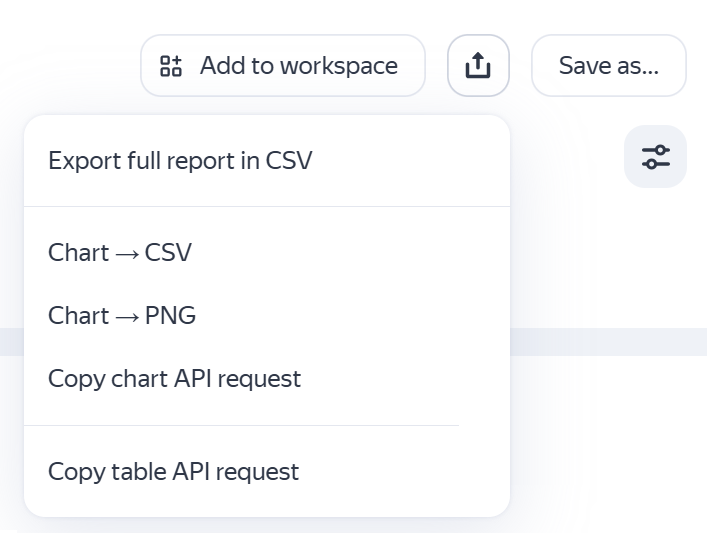
In the upper-right corner click  and select the action:
- Export full report in CSV to export data from the table in
CSVformat. - Chart → CSV to export data from the chart in
CSVformat. - Chart → PNG to export chart images in
PNGformat. - Copy chart API request — Displays the query text for exporting data from the chart using the Reporting API.
- Copy table API request — Displays the query text for exporting data from the table using the Reporting API.
You can use these requests to build your own dashboard or create automated data export scripts.
If you are getting the text of the query for the first time, make sure that the browser doesn't block the pop-up authorization window. In the authorization window, allow Analytics module to access the data.
If you didn't find the answer you were looking for, you can use the feedback form to submit your question. Please describe the problem in as much detail as possible. Attach a screenshot if possible.