Transferring revenue from the Boost to Yandex Direct
You can transfer your revenue or a part of it from the Boost to a Yandex Direct account for advertising campaigns. To do this, you need to meet the requirements and fill out the form to enable the balance offset option in the Boost. The option is enabled once and remains active until one of the parties disables it.
Requirements for enabling the option
You can transfer your revenue to any organization's account when the following requirements are met:
-
Clients of Boost and Yandex Direct have signed an agreement under the offer with the client of Air Smart Advertising Solutions FZ-LLC:
-
The agreement currency in the Boost is the same as in Yandex Direct.
If you have different currencies, go to your profile settings in Yandex Direct and open an account in the same currency as in Boost.
-
The agreements in the Boost and Yandex Direct are in effect.
Enabling an offset
-
Open Ad Monetization → Payout.
-
Go to the Transfer YAN revenue to fund Yandex Direct campaigns section and fill in the fields based on the type of transfer:
If you want to transfer your revenue every month to launch ad campaigns in Yandex Direct:
-
Select the transfer type Transfer to Yandex Direct account.
-
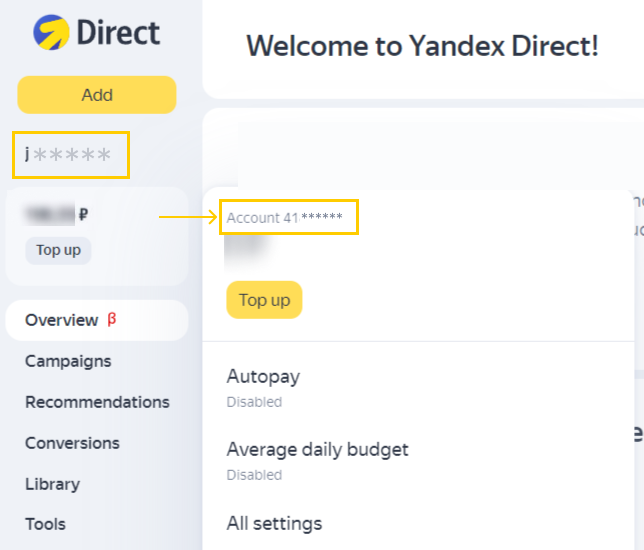
Specify the client username and account number from your Yandex Direct account.
How it works
-
Select a payer (organization name in Yandex Direct) from the drop-down list.
-
In the Transfer field, set parameters for a monthly transfer of revenue to Yandex Direct: the percentage and maximum amount to transfer. If you don't reach the payout threshold in a given month, a balance offset transfer won't be made.
Here are some examples:
Transfer no more than a certain amount
Let's say you want to transfer 10,000 conventional units from your Boost revenue to Yandex Direct.
To do this, specify the following under Transfer:
- Percentage of remuneration: 100.
- In the amount not exceeding: 10,000.
If your revenue from the Boost is equal to or larger than 10,000, the amount to transfer to Yandex Direct will be 10,000. The remaining revenue will be paid to the account specified in the payment information.
If your monthly revenue is less than 10,000, the entire Boost revenue amount will be transferred to your Yandex Direct account.
Transfer a percentage of revenue
Let's say you want to split your Boost revenue, transferring half to your Yandex Direct account and the other half to your bank account.
To do this, specify the following under Transfer:
- Percentage of remuneration: 50.
- In the amount not exceeding: Amount that exceeds your monthly revenue, such as 100,000.
Precisely 50% of your Boost revenue will be transferred every month.
-
Accept the terms.
-
Click Confirm.
If you need to make regular monthly payments in Yandex Direct:
-
Select the transfer type Outstanding balance payment.
If your revenue is larger or equal to the amount you owe, your outstanding Yandex Direct balance will be automatically paid from your Boost revenue. The remaining Boost revenue will be paid out to the account you specified in your payment information.
-
Specify the client username and account number from your Yandex Direct account.
-
Accept the terms.
-
Click Confirm.
-
-
If there are no errors in the form, an email will be sent to the Yandex Direct client requesting confirmation to enable the balance offset option.
-
The Yandex Direct client will need to confirm the receipt of revenue from the Boost by clicking the button in the email. The option activation should be confirmed within 14 days of submitting the form.
-
Once the option is enabled, you'll receive a notification in the Boost interface.
Alert
The option is not enabled if:
- The activation form contains errors.
- The activation requirements or offer terms are not met.
- The Yandex Direct client hasn't given consent to offset revenue from the Boost in the email.
Changing the offset terms
You can change the terms within 24 hours of option activation.
What you can change:
- Yandex Direct client.
- Transfer account.
- Percentage of Boost revenue.
- Maximum transfer amount.
To do this:
- If you want to disable the offset, follow the instructions below.
- Fill out the form in the Boost interface and provide new information.
- Wait for the Yandex Direct client's confirmation.
Disabling the offset
You can disable the offset whenever you want:
- In the Boost interface, go to Ad Monetization.
- In the Yandex Direct balance offset form, click Disable.
Contact support Boost.
You can find the username of the Yandex Direct client on the main page of the Yandex Direct interface, to the left of the sections column.
You can find the client's account number in the Yandex Direct interface or in Yandex Balance. Enter a numeric value. If you obtain it from Yandex Balance, copy the digits after the hyphen.
Under the partnership terms of the Boost, the payout threshold is set at 150 US dollars, 100 euros, or 500 dirhams.