App moderation
All apps go through a review process to verify compliance with the User Agreement and Requirements for ads in mobile apps.
Review process and timeline
-
After an app is added, it's automatically submitted for review. Once you do that, an app with a unique ID and the Under moderation status will appear in the Ad Monetization → Applications section of the Boost interface.
-
The review process for mobile apps typically takes no more than two days. However, it can take longer in some rare cases.
-
After the review is complete, you'll see a notification about its outcome in the Notifications tab of the Boost interface. If the app passes review, its status changes to Active.
How it looks in the interface
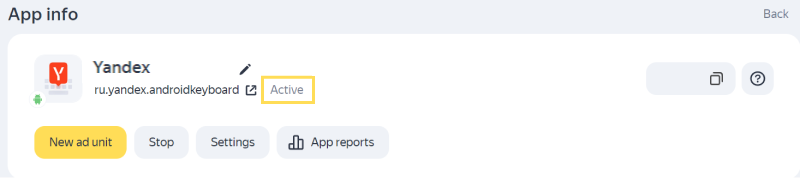
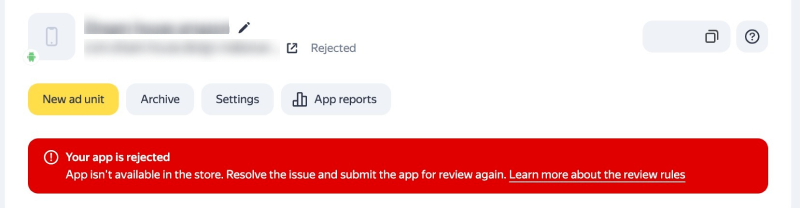
If your app fails moderation, its status will change, and you'll see the rejection reason (see details below).
How it looks in the interface
Alert
You can create and place ad units right after adding your app. However, you'll only get paid for impressions if the app passes moderation and has the Active status.
Why might the Boost reject my application?
Here are the typical reasons why submissions may be rejected.
|
Reason for rejection |
Examples |
Recommendations |
How soon you can resubmit the app for review |
|
The app is not available in the store |
The store link doesn't lead to the app page or the app has been removed from the store. |
Make sure the app is available in the store, fix any technical problems, and resubmit it for review. |
1 day after rejection. How do I apply?1. Open the Ad Monetization → Applications tab. 2. Click View next to the app name in the list. 3. Press Actions → Send to moderation. The button will be available 1 day after the last rejection. |
|
Violation of ad unit placement terms |
Placement of any inappropriate elements on an ad unit. |
Make sure the positioning of your ad units complies with the ad unit placement terms Rules of participation in Boost. |
1 day after rejection. How do I apply?1. Open the Ad Monetization → Applications tab. 2. Click View next to the app name in the list. 3. Press Actions → Send to moderation. The button will be available 1 day after the last rejection. |
|
Low-quality ad traffic to the advertiser's resource |
|
|
Repeatedly blocked apps may be permanently rejected without further moderation or the option to add it. |
|
The app doesn't comply with the Rules of participation in Boost for other reasons |
According to the Rules of participation, Boost reserves the right to reject any resource without explaining the reason behind the decision. For more information on cases where this rule may apply, see User Agreement and Requirements for ads in mobile apps. |
Review the list of potential issues and improve the quality of your app. |
30 days after rejection. |
If the review process reveals violations that Yandex deems critical, Boost reserves the right to reject the app with no option for another review (in accordance with the User Agreement).
Warning
Besides reviewing new apps being added to the Boost, Boost may also routinely review existing apps. If a routine review reveals serious violations, the partner's app or account may be suspended.
Read the complete list of rules and requirements for apps in the documents:
If your app was suspended due to invalid clicks and impressions, but you believe it doesn't violate the User Agreement and Requirements for ads in mobile apps, please submit an appeal. We will review your app, but we cannot guarantee a different outcome.
How it looks in the interface
