Statistics and dashboard
Reporting and analytics tools
Boost provides partners with convenient tools to analyze statistics, increase the efficiency of their ad units and, as a result, raise revenues.
You can access the analytics tools on the Reports page. On that page, you can:
- Build a report from a template.
- Create a custom report from scratch and save it.
- View reports as a chart or table.
- Download reports to your computer.
- Add reports to the dashboard as a widget.
You can also access reports for a specific app or ad unit from the list:
- Apps (Ad Monetization → Applications).
- Ad units (Ad Monetization → Ad Units).
To view statistics, find the app or ad unit in the list and click Statistics next to it.
Saved reports can also be added to the dashboard as widgets.
Getting an OAuth token to integrate statistics from the Boost
You can integrate statistics from the Boost into another network's dashboard. Only some ad networks support this option. Check your network's Help Center to confirm integration support.
To integrate statistics:
-
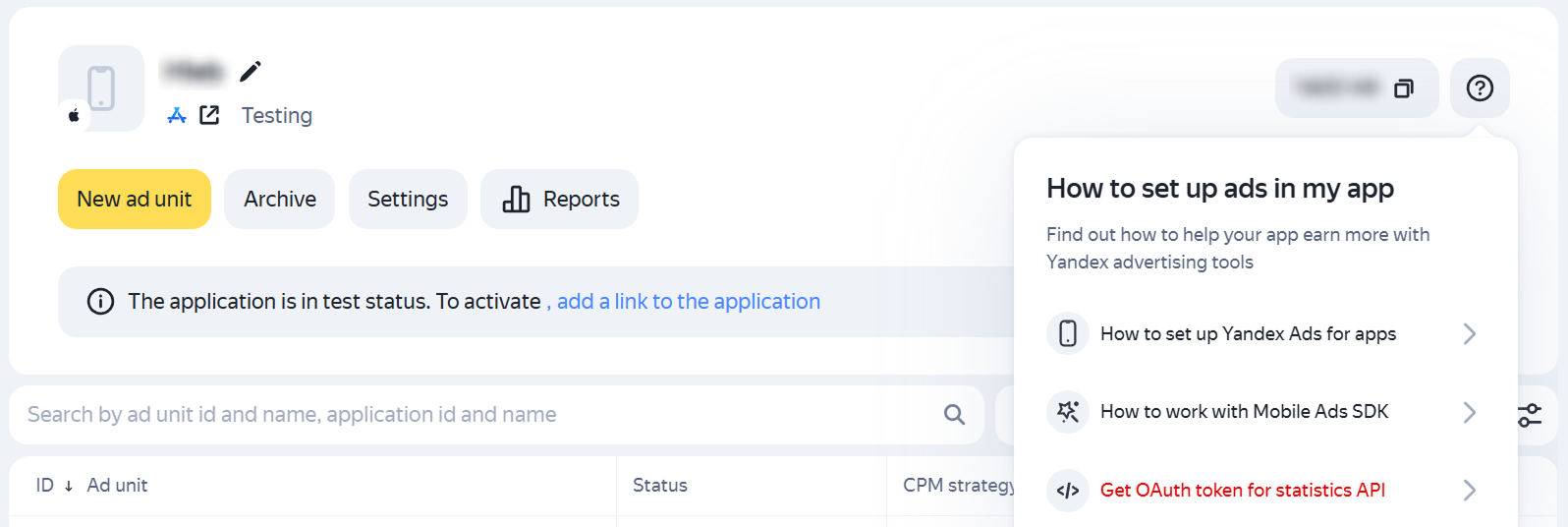
In the Boost interface, go to Ad Monetization → Applications and open the app card.
-
To the right of the app name, click
 → Get OAuth token for statistics API.
How it looks in the interface
-
The Yandex ID authorization window opens. Log in to the account you used to register with the Boost.
-
A page with the token opens. Copy the token and paste it in the third-party ad network interface.
Learn more about how to use an OAuth token in the Statistics API documentation.