ANR
当运行在主线程上的任务耗时过长时,就会发生 ANR(应用未响应)错误。 在此期间,应用程序界面停止更新并不响应用户操作。 结果会弹出一个对话框,提示用户等待或关闭应用。
报告显示ANR最常发生的时间。 使用这些信息来准备修复。
报告中的数据可以按会话类型过滤:
- 仅后台会话;
- 没有后台会话;
- 对于所有会话。
您可以配置ANR监控机制并设置超时时间:
// Creating an extended library configuration.
Analytics moduleConfig config = Analytics moduleConfig.newConfigBuilder(API_KEY)
      // Enabling ANR monitoring. The default value is false.
      .withAnrMonitoring(true)
      // Override the ANR timeout if needed. The default value is 5.
      .withAnrMonitoringTimeout(7)
      .build();
// Initializing the AppMetrica SDK.
Analytics module.activate(getApplicationContext(), config);
// Creating an extended library configuration.
val config = Analytics moduleConfig.newConfigBuilder(API_KEY)
   // Enabling ANR monitoring. The default value is false.
      .withAnrMonitoring(true)
      // Override the ANR timeout if needed. The default value is 5.
      .withAnrMonitoringTimeout(7)
   .build()
// Initializing the AppMetrica SDK.
Analytics module.activate(applicationContext, config)
var configuration = Analytics moduleCrashesConfiguration()

// Enables detection of situations when the main application thread stops responding (ANR)
configuration.applicationNotRespondingDetection = true

// Sets the time interval that the watchdog will wait before reporting the ANR status
configuration.applicationNotRespondingWatchdogInterval = 4.0

// Sets the frequency with which the watchdog will check the ANR status
configuration.applicationNotRespondingPingInterval = 0.1

Analytics moduleCrashes.crashes().setConfiguration(configuration)
或
Analytics moduleCrashes.crashes().enableANRMonitoring()
AMAAppMetricaCrashesConfiguration *configuration = [[AMAAppMetricaCrashesConfiguration alloc] init];

// Enables detection of situations when the main application thread stops responding (ANR)
configuration.applicationNotRespondingDetection = YES;

// Sets the time interval that the watchdog will wait before reporting the ANR status
configuration.applicationNotRespondingWatchdogInterval = 4.0;

// Sets the frequency with which the watchdog will check the ANR status
configuration.applicationNotRespondingPingInterval = 0.1;

[[AMAAppMetricaCrashes crashes] setConfiguration:configuration];
或
[[AMAAppMetricaCrashes crashes] enableANRMonitoring];
报告期
您可以查看某一天的报告或为特定时间段生成报告。
要设置自定义报告期,请使用 按钮。 所选时间间隔可以按小时、天、周或月进行分组。
分组数据
报告中的数据可以按以下方式分组:
- ANR 组
- App 版本
- Device
- OS版本
- Manufacturer
指标
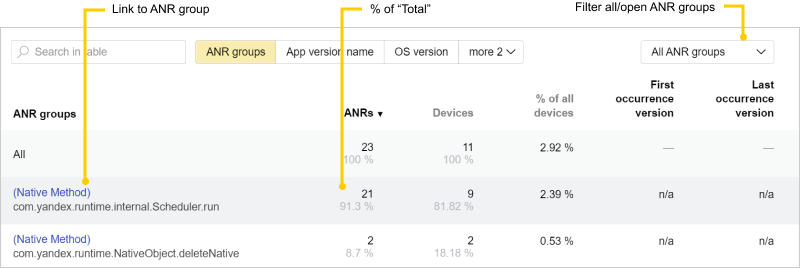
以下是可用于分析的指标:
- ANRs:错误数量。
- 设备:在选定的时间段内至少报告过一次错误的设备数量。
- % 的所有设备:在选定时间段内运行应用的总设备数中,注册了错误的设备所占的百分比。
- 首次注册错误的应用版本:首次记录错误的应用版本。
- 最后一次重现:错误最后被记录的应用版本。
您可以访问ANR组详情页面。 要做到这一点,点击右上角的 ANR 组名称。
ANR 符号化
备注
无法为之前的构建重新生成映射文件。 但是,如果您有由我们的崩溃插件为之前的构建生成的归档文件,可以手动上传它们。
如果在应用构建过程中未上传映射文件或 dSYM 文件,组列表中会出现关于未符号化 ANR 的警告。
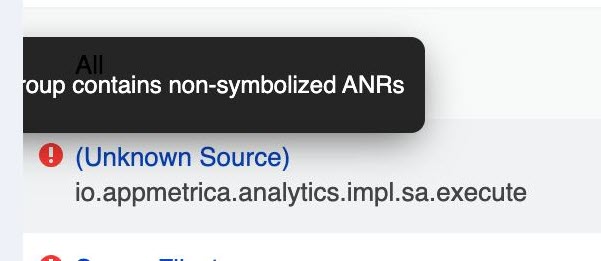
如何对ANR进行符号化:
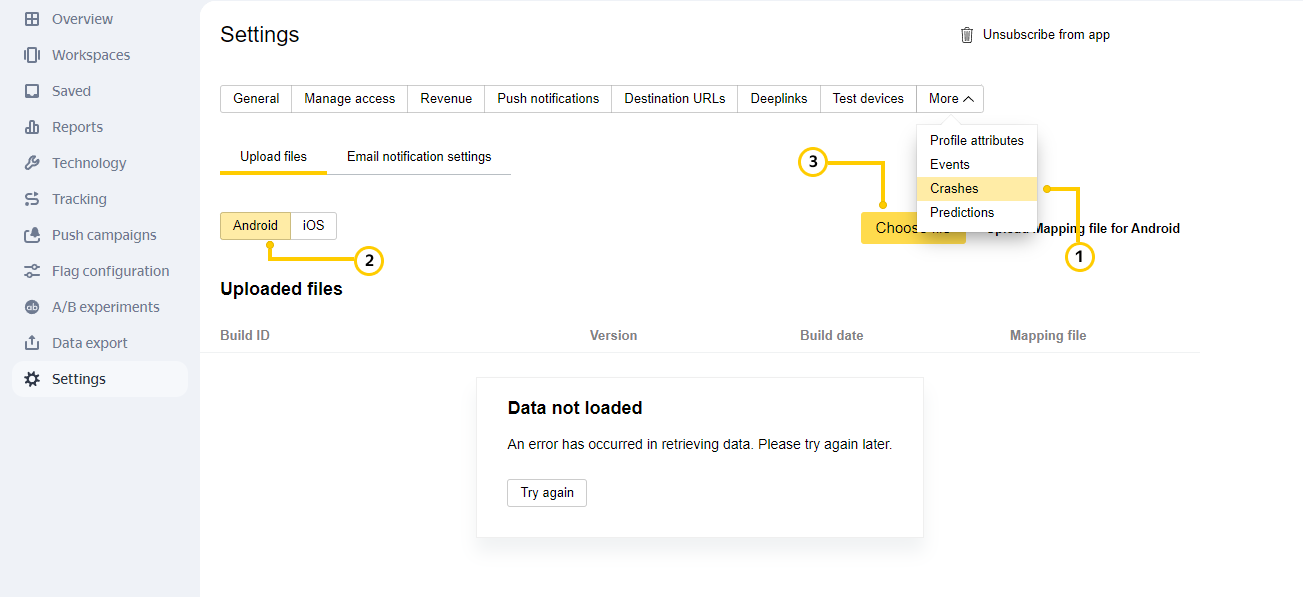
要上传映射文件:
- 打开设置 → 崩溃。
- 确保为 Android 选中文件上传。
- 选择要上传的文件。
您可以在应用的设置 → 崩溃页面查看缺失文件的列表Analytics module。
上传 dSYM 文件(iOS)。 您可以在应用的设置 → 崩溃页面查看缺失文件的列表Analytics module。
查看ANR日志
要查看日志:
- 点击所需 ANR 组的名称以打开该组事件的报告。 数据将显示为原始报告中选择的同一会话类型。 如果需要,您可以选择不同的会话类型。
- 在表格中,点击打开 ANR 日志。
日志显示设备信息和ANR详情。
从日志中进入个人卡片,查看导致 ANR 的前置事件。 要做这一步,点击查看会话事件。
添加评论
如果需要,您可以为 ANR 添加评论。 这在多个开发人员查看报告时会很有用。 例如,您可以在 Yandex Tracker 的评论中添加指向问题的链接。
要添加评论,请打开相应的组,然后在评论字段中输入文本。
关闭ANR
关闭固定的ANR以从报告中移除它们。 已关闭的ANR会在检测到它们出现在之前未发现它们的版本中时自动重新打开。
要关闭 ANR,请打开相关组。 在右上角,将ANR 组状态设置为已关闭。

数据导出
您可以将 ANR 日志描述导出为 TXT 文件。 要做这一步,打开相应的 ANR 组,然后点击 打开 ANR 日志→ 导出。
了解更多
如果您没有找到所需答案,可以通过反馈表单提交您的问题。 请尽可能详细地描述问题。 如果可能,请附上截图。